19. The Play-Money Bankroll
The Finance Manager maintains your players' play-money bankrolls. Every credit and every debit is a transaction. The FINANCE MANAGER page has these areas:
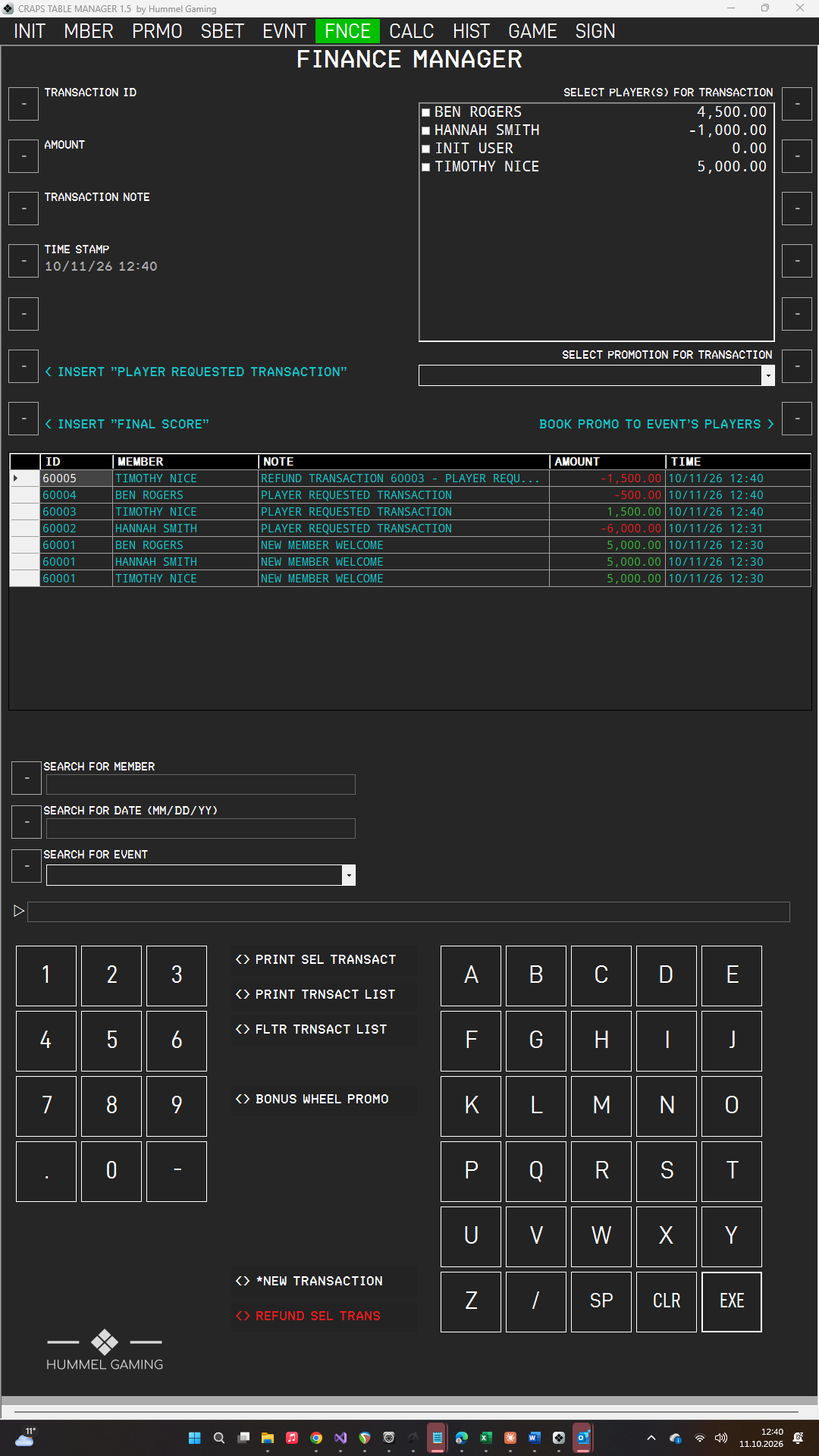
| Area | What it shows |
|---|---|
| Data fields on the left | The transaction you are preparing: TRANSACTION ID, AMOUNT, TRANSACTION NOTE, and TIME STAMP. |
| SELECT PLAYER(S) FOR TRANSACTION | The players with their current balances. Double-tap a name to tick it. |
| SELECT PROMOTION FOR TRANSACTION | The promotions of the active event, together with the button BOOK PROMO TO EVENT'S PLAYERS. |
| DG in the middle | All transactions. |
| Search area at the bottom | SEARCH FOR MEMBER, SEARCH FOR DATE, and SEARCH FOR EVENT. |
How Balances Work#
A player's balance is the sum of all of that player's transactions. A positive amount adds play money; a negative amount takes it away. Amounts always appear in the US format, for example 1,000.00.
- Transactions are never changed or deleted. To correct a mistake, you refund the transaction. A refund is a new transaction for the opposite amount.
- With an active event, the player list shows only that event's players, and every transaction is assigned to the event. Without an active event, the list shows all members who are not locked, and transactions are not assigned to any event.
- The amount applies to every player you tick. If you tick two players and book 100.00, both receive 100.00.
→ See Refunding a Transaction.
The Transaction List#
The DG lists all transactions, newest first. Its columns are ID, MEMBER, NOTE, AMOUNT, and TIME. The time column shows the date in your chosen date format and the time in the 24-hour format.
A transaction for several players appears once per player, under the same ID. Tap a row to select it; you need a selected row to refund a transaction or to print a receipt.
The TIME STAMP data field shows the current time while you prepare a new transaction, and the stored time when you refund a transaction.