11. Promotions
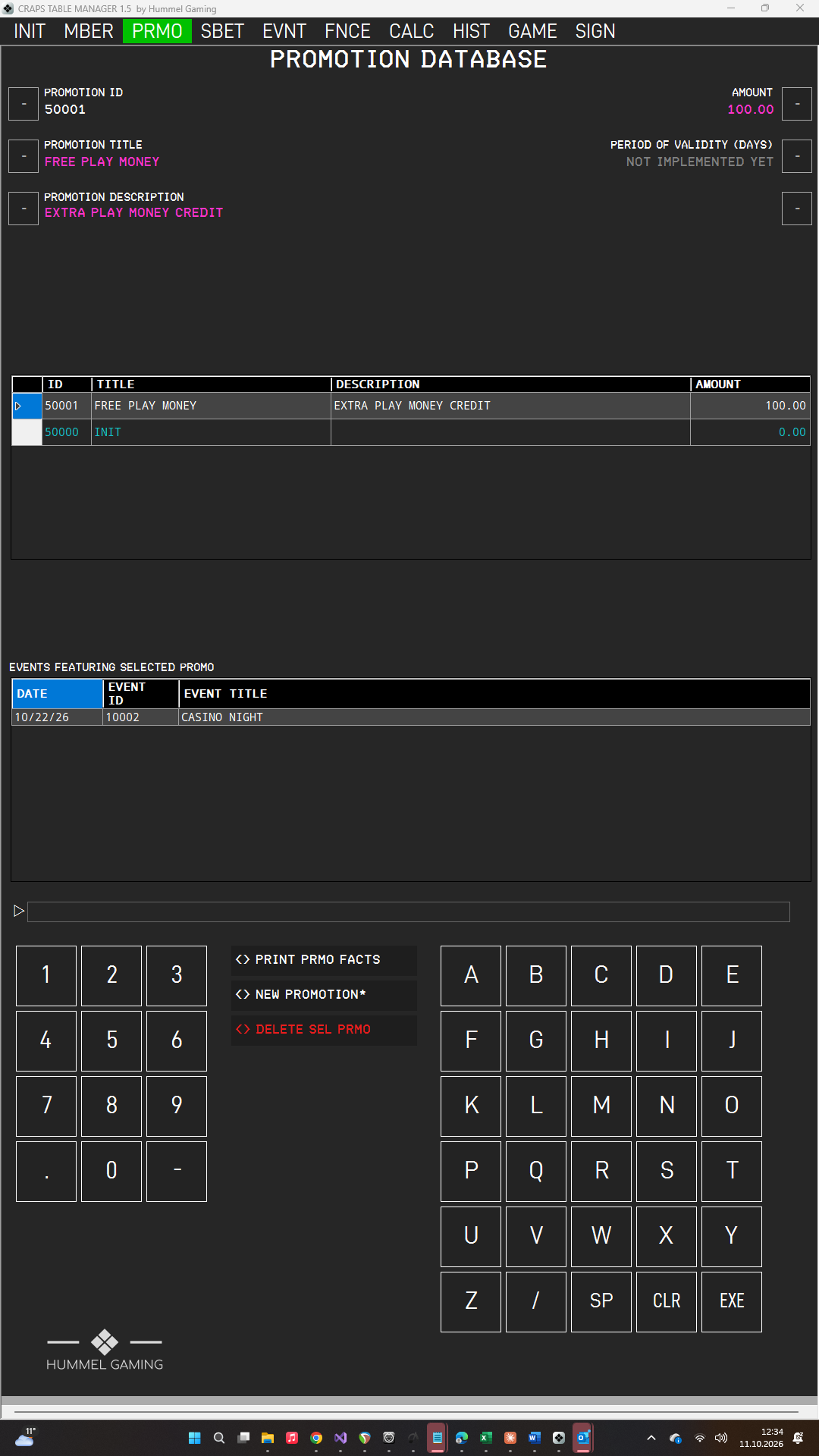
A promotion is a play-money credit that you book to the players of an event, for example a welcome bonus. You create promotions once and then select them for every event that offers them. The PROMOTION DATABASE page has data fields for the selected promotion, a DG listing all promotions sorted by title, and a second DG showing where the selected promotion is used.
Creating, Editing and Deleting a Promotion#
Creating a promotion
- Open PRMO and press NEW PROMOTION*. CTM clears the data fields and assigns the next free PROMOTION ID.
- Type the title and press the LSK next to PROMOTION TITLE. Do the same for PROMOTION DESCRIPTION and AMOUNT.
- Press EXE. The promotion appears in the DG.
Always begin with NEW PROMOTION*.
The AMOUNT is the credit that each player receives when you book the promotion. You can enter it as 100 or 100.00; CTM displays it as 100.00.
Editing a promotion
Tap the promotion in the DG, change a value, and press EXE. To empty a data field, press CLR on an empty ScratchLine and then the LSK next to it.
Deleting a promotion
Tap the promotion in the DG and press DELETE SEL PRMO. Confirm with EXE or cancel with CLR. Bookings you have already made are not affected.
PERIOD OF VALIDITY (DAYS) is reserved for a future version and currently has no function. In the meantime, CTM offers to refund promotion credit after 90 days.
→ See Auto-Refund of Booked Promos.
The entry INIT is part of the initial database. Leave it as it is.
Events Featuring a Promotion#
When you tap a promotion, the lower DG EVENTS FEATURING SELECTED PROMO lists the events that use it, showing date, event ID, and title. You select the promotions for an event in the Event Manager.
→ See Side Bets and Promotions for an Event.
Printing Promotion Facts#
Tap a promotion and press PRINT PRMO FACTS. The print window opens. The printout fits on one page under your company header and shows the title, the amount, the description, and the events that use the promotion.