14. Players and Positions
Every event has its own list of players. Your players stand around the table, and their positions determine the shooter order. As the dealer, you enter each player's position in CTM as it appears at the table, so that the order in the software matches the order in which your guests actually stand.
Adding Players#
- Select the saved event in the DG.
- Press +ADD/DEL PLAYERS. The ADD OR DELETE PLAYERS sub page opens, listing all members who are not locked, with their balances.
- Tap a name to tick or untick it. Ticked members take part in the event.
- Press EXE to save your selection, then press RETURN.
Players who are already in the event keep their positions when you add others. If you untick a player, that player is removed from the event, and the position becomes free again. Locked members do not appear in the list.
Assigning Positions#
Wait until your guests have taken their places at the table, then enter each player at the position where he or she stands.
- Press POS OF PLAYERS. The POSITIONS OF PLAYERS sub page opens, showing a diagram of the table with positions 1 to 12 and a DG with the players of the event.
- Tap a player in the DG.
- Press the LSK with the number of the position. The position shows the player's initials on a green background, and the DG shows the position number.
- Repeat this for every player, then press RETURN.
The diagram shows the table from your point of view: the stickman at the top, the dealer at the bottom, 3RD BASE on the left, and 2ND BASE on the right. Positions 1 to 6 run down the left side from the stickman to the dealer, and positions 7 to 12 run down the right side in the same direction.
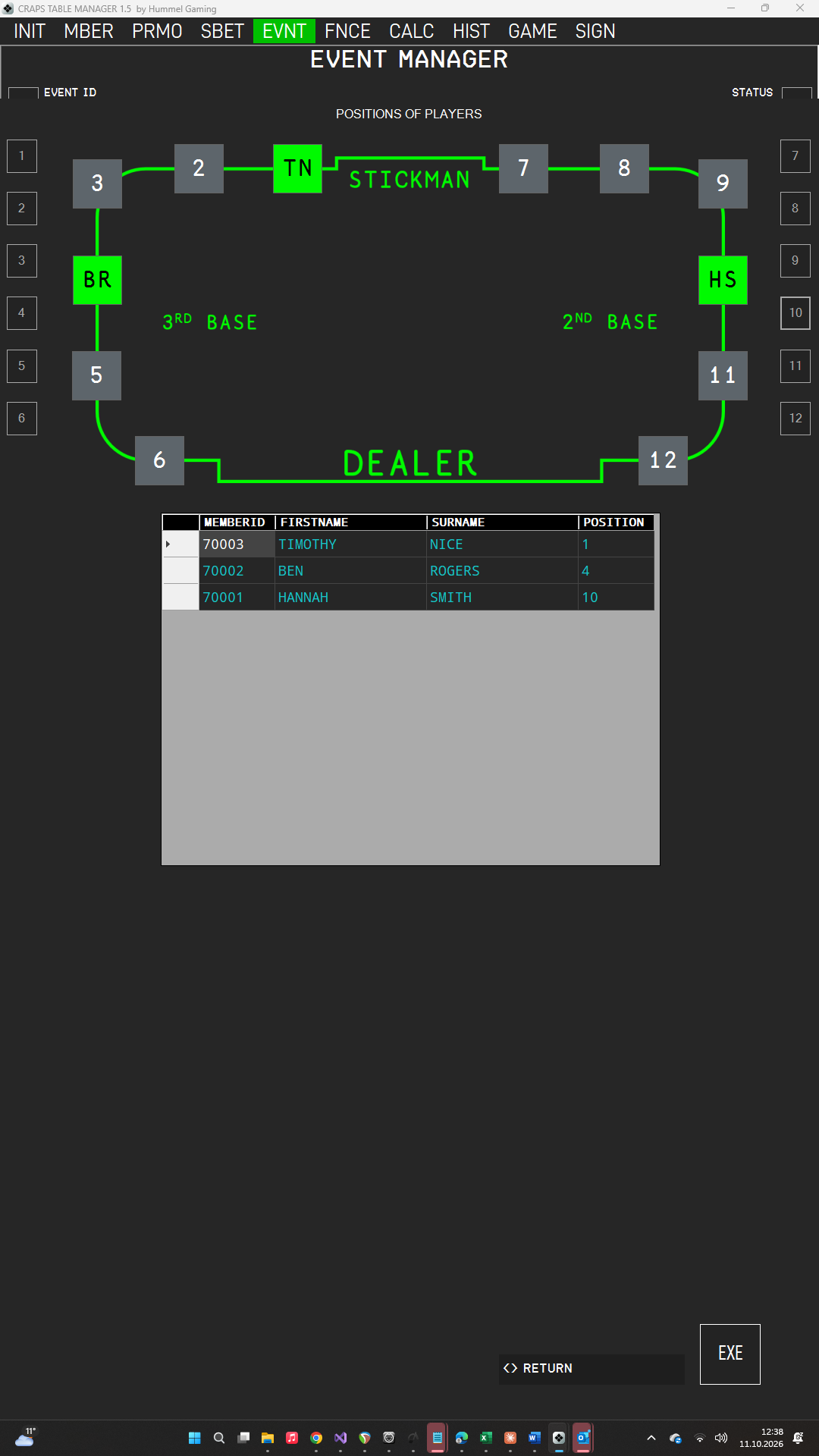
Each assignment is saved immediately. To free a position, tap the player and press the position's LSK again. To move a player, tap the player and press the LSK of a different position. If you press a position that another player occupies, the selected player takes it over, and the other player is left without a position.
The POS OF PLAYERS button is amber while the event has no players or while any player lacks a position. It turns green once every player has a position. After you have assigned every position, press EXE in the Event Manager to save the event; its status then changes to PREPARED.
Positions during the game. CTM works strictly by the order you entered, so players should not change places during the game. If the order at the table does change, you can open POS OF PLAYERS from the game dashboard at any time and adjust the positions.
Jackpot (Pro). Only players with a position can take part in a Side Bet Jackpot.
→ See Progressive Jackpot.
→ See Player Positions and the Shooter.
Shooter Order#
During the game, the dice pass from position to position in a fixed order. The first shooter is the player at the first occupied position in this sequence: positions 6, 5, 4, 3, 2, and 1, then positions 7, 8, 9, 10, 11, and 12. After the last player, the dice return to the first. Empty positions are skipped.