28. Recording the Game
Entering Rolls#
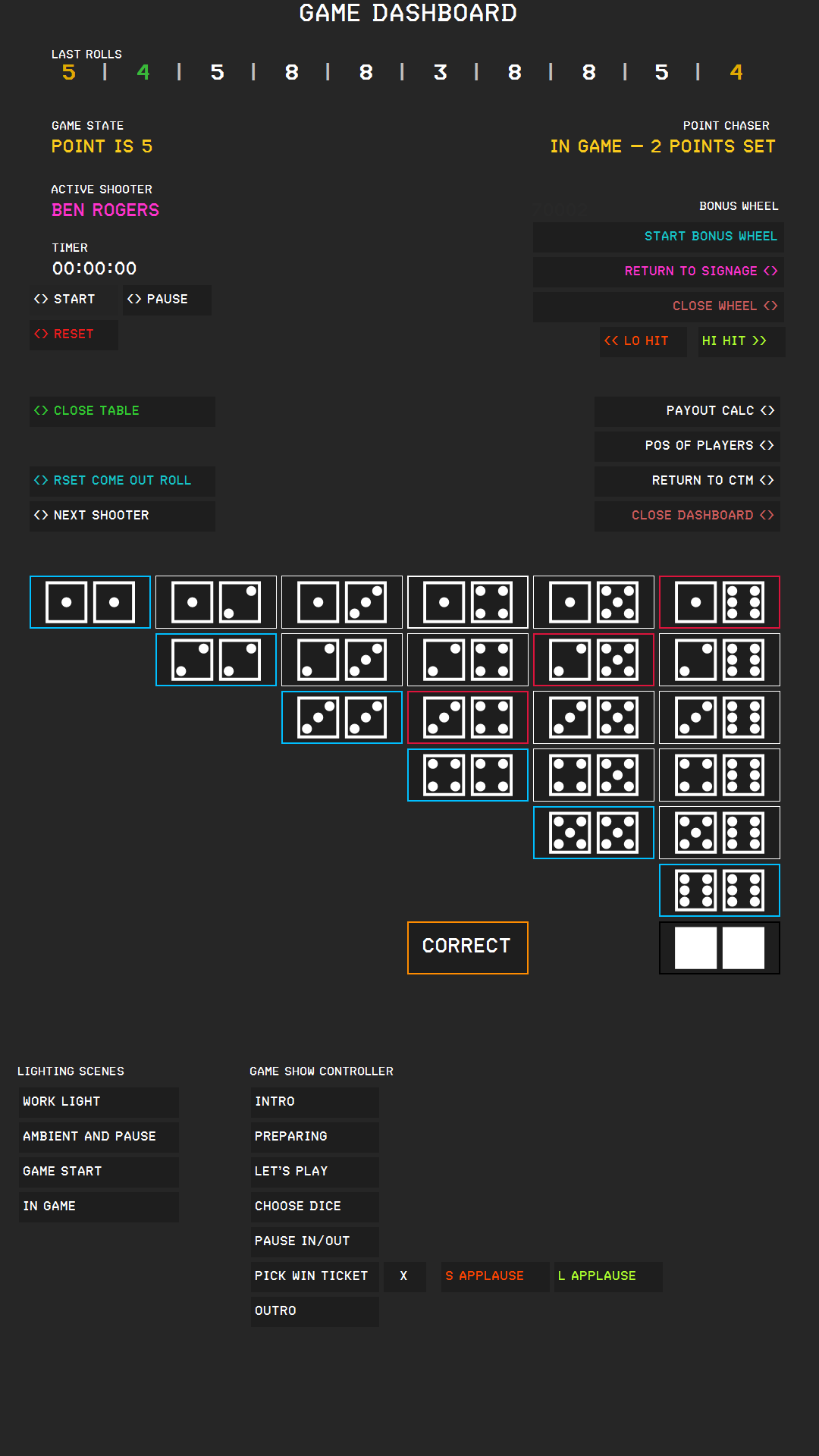
Tap the button that shows the two dice which have been rolled. The buttons form a triangle, with one button for every combination, because the order of the dice does not matter: 2 and 5 is the same button as 5 and 2. A button with a red frame shows two dice that add up to 7, and a button with a blue frame shows hardway combinations, snake eyes or box cars.
CTM saves the total, both dice, the shooter, the game state, and the time. It updates the game state, the last rolls, the lights, and the sound, and it sends the roll to the digital signage.
Game States#
| Game state | Color | Meaning |
|---|---|---|
| COME OUT ROLL | Pink | The next roll is a come-out roll. |
| POINT IS followed by a number | Amber | A point is set. The shooter tries to roll it again before a 7. |
| POINT WON followed by a number | Green | The shooter rolled the point. |
| SEVEN OUT | Red | The shooter rolled a 7 while a point was set. |
On the come-out roll:
- 7 or 11 is a natural; the state stays COME OUT ROLL.
- 2, 3, or 12 is craps; the state stays COME OUT ROLL.
- 4, 5, 6, 8, 9, or 10 sets the point; the state changes to POINT IS.
With a point set:
- The point number produces POINT WON, and the shooter keeps the dice.
- A 7 produces SEVEN OUT, and the dice pass to the next player.
- Any other number keeps the state at POINT IS. If both dice are equal on a 4, 6, 8, or 10, CTM treats the roll as a hard way for the lights and the sound.
After POINT WON or SEVEN OUT, press RSET COME OUT ROLL. The dice buttons remain blocked until you do.
The Roll History#
LAST ROLLS shows the totals of the last ten rolls, the newest on the left. The colors indicate what each roll meant.
| Color | Meaning |
|---|---|
| Green | A natural (7 or 11) on the come-out roll, or the point in the point phase. |
| Red | Craps (2, 3, or 12) on the come-out roll, or a 7 in the point phase (seven out). |
| Amber | A point was set on the come-out roll. |
| White | Any other roll in the point phase. |
| Gray X | A no roll. |
Shooter Rotation#
The dice pass from position to position in this order: 6, 5, 4, 3, 2, 1, 7, 8, 9, 10, 11, 12. After the last player, they return to the first. Empty positions are skipped.
- After a seven out, CTM passes the dice on by itself.
- After a won point, the same shooter continues.
- NEXT SHOOTER passes the dice on manually, for example when a player leaves the table. It does not record anything.
Recording a No Roll#
Press NO ROLL (the button with the two blank dice) when a roll does not count, for example when the dice leave the table. CTM saves a no roll for the shooter and adds a gray X to the last rolls. The game state and the shooter do not change, and the lights and sound for a no roll play. The statistics count no rolls separately.
Correcting a Roll#
Press CORRECT if you recorded a wrong roll. CTM deletes the last recorded roll of the active event without asking, then recalculates the game state, the shooter, and the last rolls from the rolls that remain. The lights and sounds do not play again.
CORRECT also reverses what the deleted roll contributed to the progressive jackpot. If that roll was a jackpot hit that you had already paid out, the payout is reversed as well.
Press CORRECT again to delete the roll before that; this also deletes a no roll.
Resetting the Game State#
Press RSET COME OUT ROLL to set the game state back to COME OUT ROLL. Use it after POINT WON and SEVEN OUT. You can also use it to drop a point that you do not want to continue. The button does not record a roll and does not change the shooter.
The Point Chaser#
The POINT CHASER display shows the state of the Point Chaser side bet. It is active when the side bet POINT CHASER is selected for the event; otherwise, it shows INACTIVE.
The bet is on how many points the shooter sets before a seven out. CTM counts the points set since the last seven out.
| Display | Meaning |
|---|---|
| READY - BETS ACCEPTED | No point has been set yet. Players can place the bet. |
| IN GAME – NO BETS ACCEPTED | One point has been set. |
| IN GAME – 2 POINTS SET to IN GAME – 7 POINTS SET | The number of points set. |
| IN GAME – +7 POINTS SET | More than seven points have been set. |
When the shooter sevens out, the display shows the result:
| Points set before the seven out | Result |
|---|---|
| 1 or 2 | LOST |
| 3 | WINNER! PAY 5 TO 1 |
| 4 | WINNER! PAY 10 TO 1 |
| 5 | WINNER! PAY 20 TO 1 |
| 6 | WINNER! PAY 30 TO 1 |
| 7 | WINNER! PAY 50 TO 1 |
| more than 7 | WINNER! PAY 150 TO 1 |
The count starts over after every seven out.