27. The Dashboard
The game dashboard is the control center at the table, where you record every roll. CTM follows the game, maintains the statistics, and drives the digital signage, the lights, and the sounds. Open it with the page key GAME.
The dashboard requires an active event.
→ See Activating an Event.
Dashboard Overview#
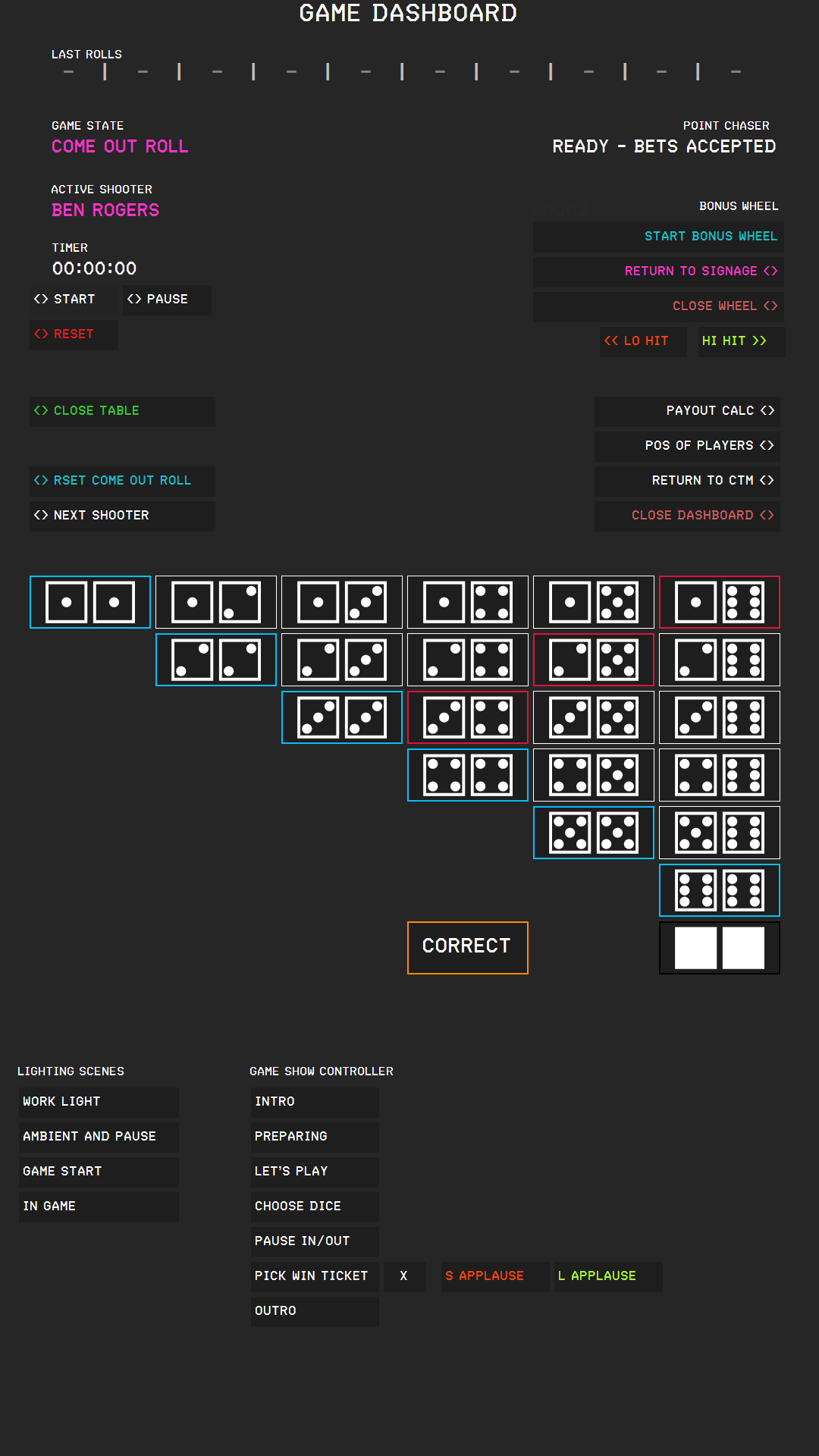
| Area | What it shows or does |
|---|---|
| LAST ROLLS | The ten most recent rolls, newest on the left. |
| GAME STATE | Where the game stands: COME OUT ROLL, POINT IS, POINT WON, or SEVEN OUT. |
| ACTIVE SHOOTER | The name of the shooter. |
| TIMER | The game timer with START, PAUSE, and RESET. |
| POINT CHASER | The state of the Point Chaser side bet. |
| BONUS WHEEL (Pro) | The buttons for the Bonus Wheel. |
| JACKPOT (Pro) | The current jackpot amount, with PAYOUT and ADJUST. Wheel Jackpot mode adds the bet counter with ADD; Side Bet Jackpot mode adds CHECK-IN. The group is hidden while the jackpot is off and in the Basic edition. |
| Function buttons | CLOSE TABLE, RSET COME OUT ROLL, NEXT SHOOTER, PAYOUT CALC, POS OF PLAYERS, RETURN TO CTM, and CLOSE DASHBOARD. |
| The dice buttons | One button for every combination of two dice, plus NO ROLL and CORRECT. |
| LIGHTING SCENES (Pro) | Sixteen numbered buttons for your light scenes. |
| GAME SHOW CONTROLLER (Pro) | Buttons for announcements and applause. |
→ See Bonus Wheel; Progressive Jackpot; Lighting Scenes; Game Show Controller and Sound Effects.
In the Basic edition, the buttons for lighting scenes, the game show controller, the Bonus Wheel, and the jackpot are hidden.
The Game Timer#
The TIMER shows the game time in hours, minutes, and seconds.
- START starts the timer; if you paused it, it resumes where it stopped.
- PAUSE stops the timer and retains the time.
- RESET stops the timer and sets it back to 00:00:00.
The timer does not start by itself, so press START when the game begins. The TMR annunciator shows whether the timer is running. The time statistics do not use this timer; they use the times of the recorded rolls.
Player Positions and the Shooter#
ACTIVE SHOOTER shows who has the dice. After a seven out, the dice pass to the next player automatically; press NEXT SHOOTER to pass them on manually.
If the order at the table changes, press POS OF PLAYERS at any time to open the positions sub page, which is the same sub page as in the Event Manager, and adjust the positions.
→ See Assigning Positions.
Without positions, there is no valid shooter. Enter the players' positions first.
Leaving and Closing the Dashboard#
RETURN TO CTM brings the main window with the page keys to the front. The dashboard stays open behind it and retains its game state, shooter, and timer. Press GAME to come back. PAYOUT CALC opens the payout calculator in the same way.
CLOSE DASHBOARD closes the dashboard. Nothing is lost by closing it: when you reopen the dashboard, it shows what it showed before, namely the game state, the shooter, the last rolls, the Point Chaser, and the timer. If the game state was SEVEN OUT or POINT WON, it still is, and you still press RSET COME OUT ROLL to continue. A running timer keeps counting while the dashboard is closed.
The timer is preserved only while CTM is running; after you restart CTM, it shows 00:00:00. If you activate a different event, the dashboard starts from scratch for that event.